A system map that keeps up with them.

See who calls what, who listens for each event, and what your next change could affect. CI keeps it in sync.

Start mapping

Free to start · No credit card required

Explore Nodeberg

Get the picture out of someone’s head.

The services live in separate repositories. The knowledge lives with a few people. Put the calls and events on one shared map, so the whole team has a place to start.

Bring the services, calls, and events from separate repositories onto one shared map.

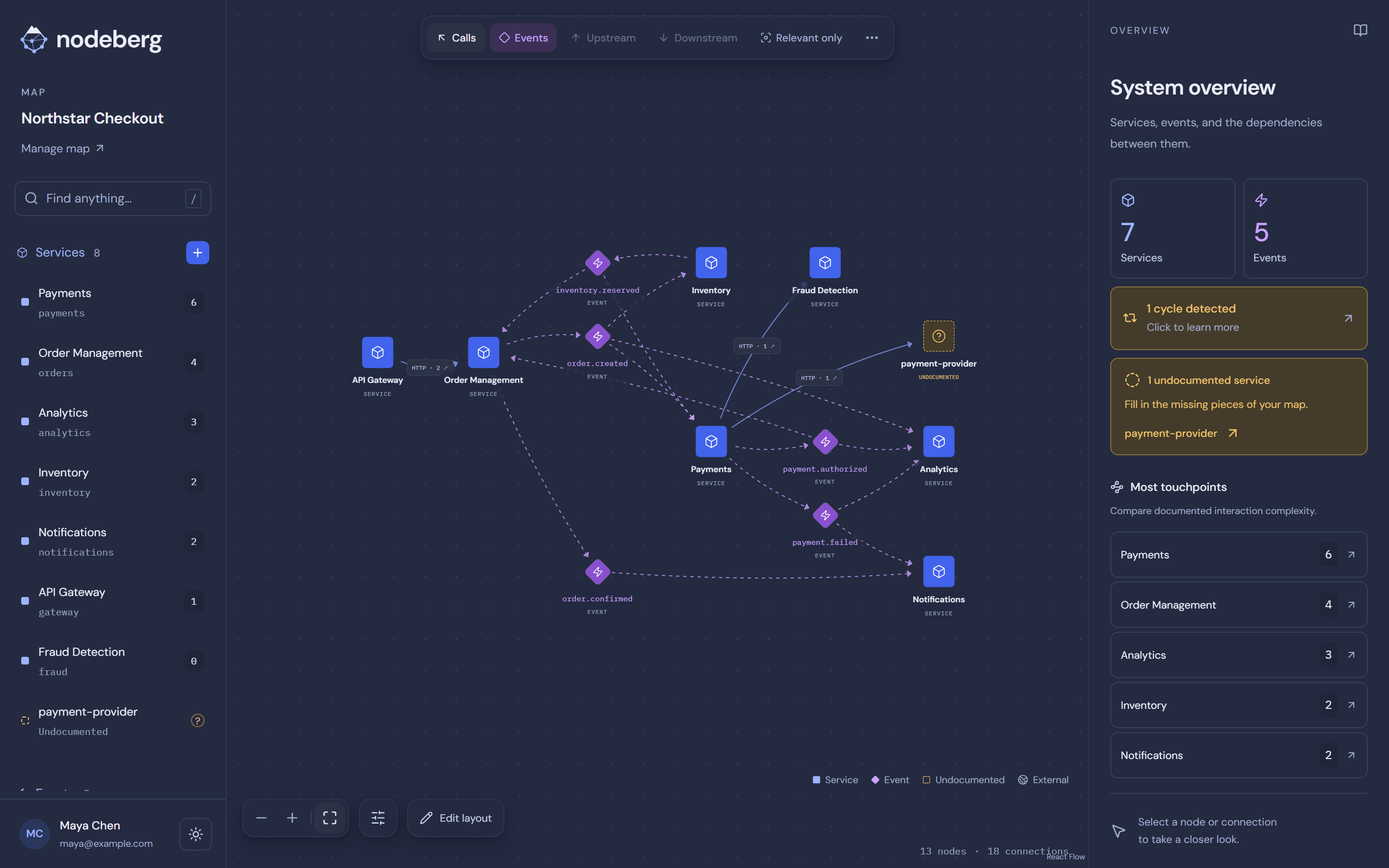
7 services. 5 events. One connected view.
Nodeberg showing the Northstar Checkout map and system overview with 7 services, 5 events, and one cyclic group.

One service changes. What does it touch?

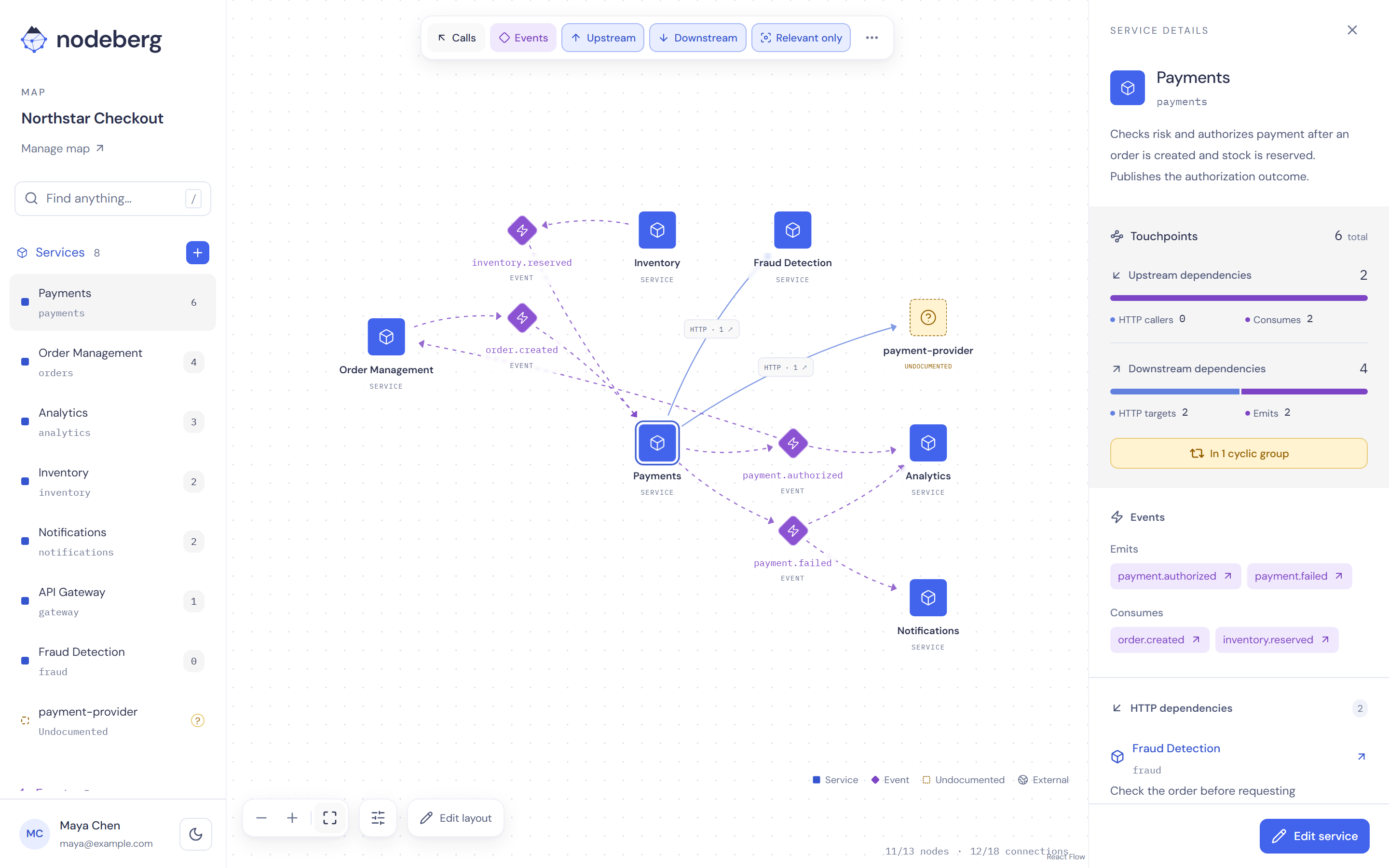
Select the service you’re working on. Bring its direct connections into focus and see the calls, incoming events, and outgoing events that deserve a closer look.

Select a service to bring its calls, incoming events, and outgoing events into focus.

Payments: 2 call targets, 2 events consumed, 2 emitted.

Nodeberg with Payments selected, Relevant only enabled, and 6 documented touchpoints in the inspector.

Before the payload changes, find the listeners.

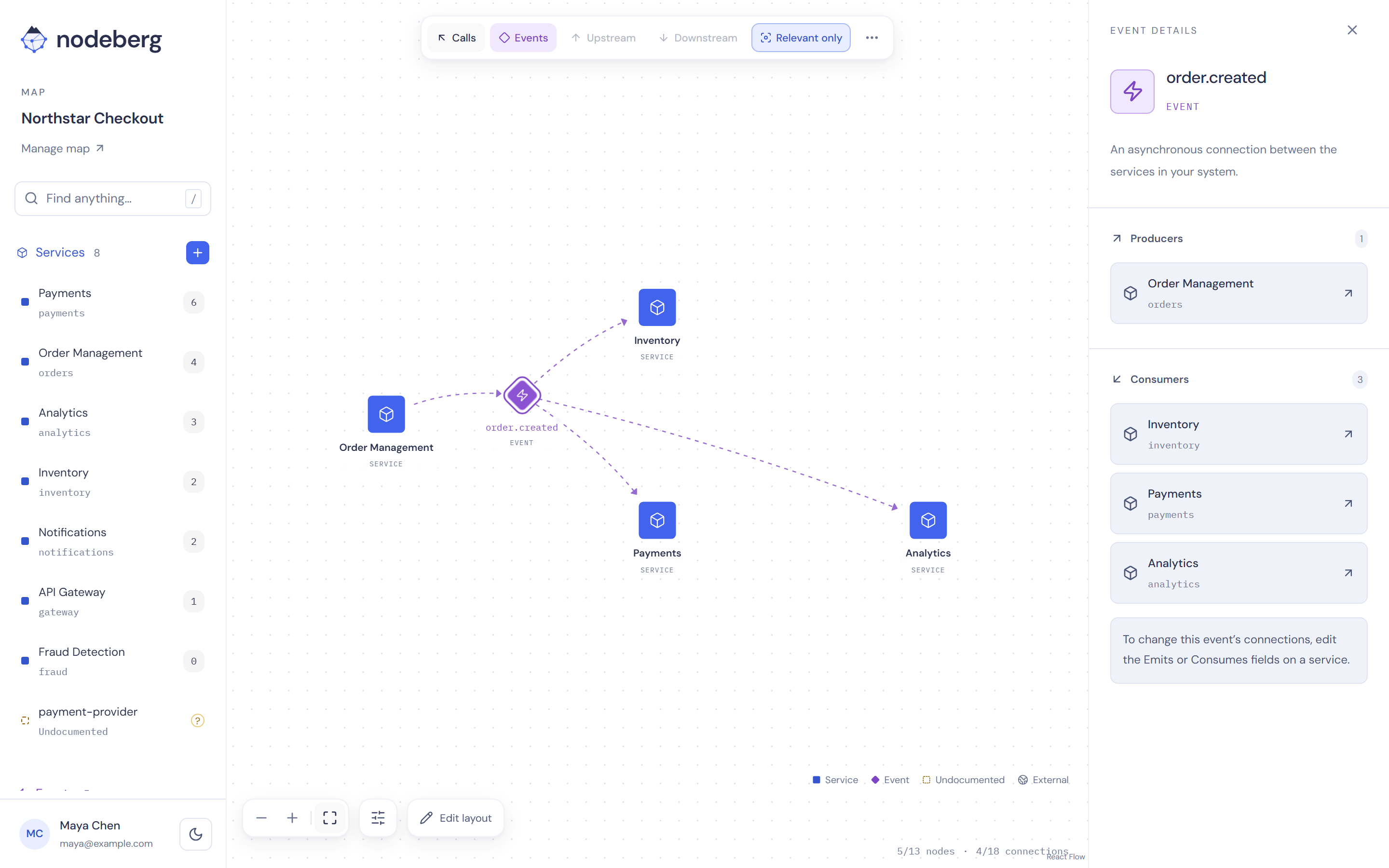
The producer is only half the story. Select an event to see which services consume it, even when they belong to another part of your system.

Select an event to find every service that consumes it, wherever it lives in your system.

order.created reaches Inventory, Payments, and Analytics.

Nodeberg showing order.created, produced by Order Management and consumed by Inventory, Payments, and Analytics.

Follow the connection. All the way back.

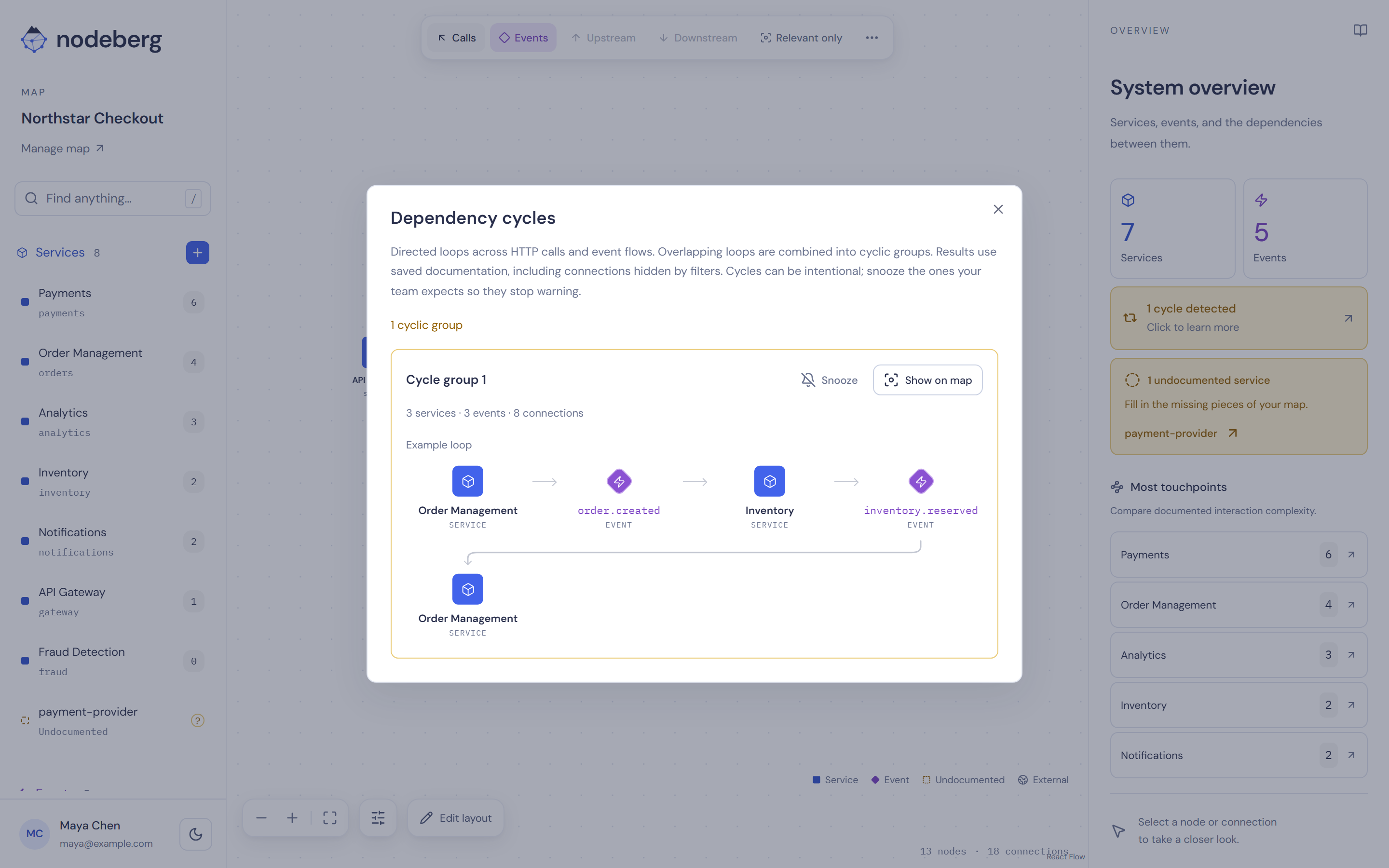
Some loops cross both calls and events. Nodeberg finds directed cycles and shows an example path, so you can trace the connections together and decide what needs attention.

Find loops across calls and events, then highlight their exact path on the map.

Review a loop, then highlight its exact path on the map.

Nodeberg dependency cycles dialog showing one cyclic group and a loop through Order Management, order.created, Inventory, and inventory.reserved.

Your code moves. Your map keeps up.

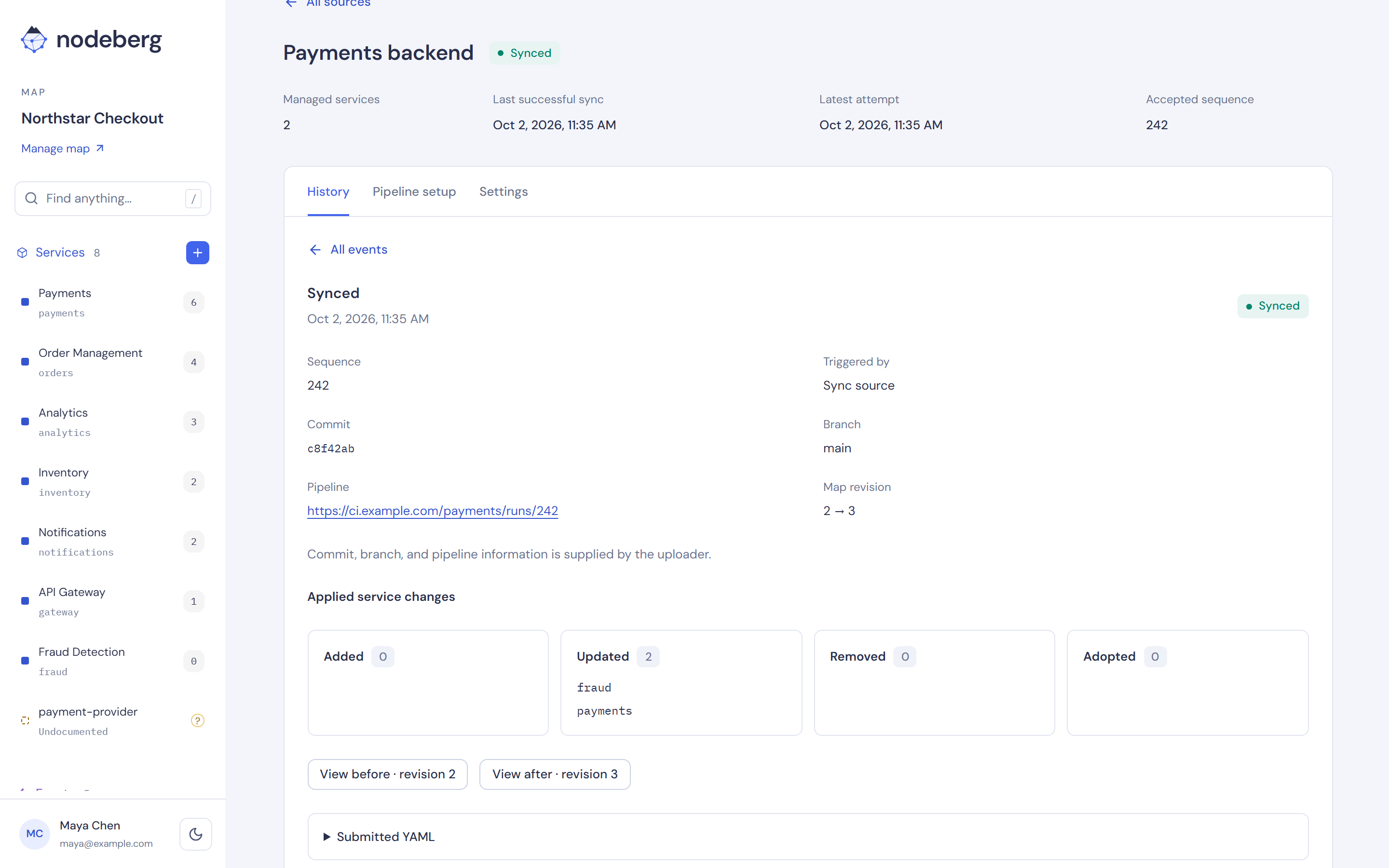
Keep architecture YAML alongside your code. Publish from CI to update your shared map, then see what changed in sync history.

Publish architecture YAML from CI to update your shared map. See what changed in sync history.

Two services updated. Trace the upload back to its commit.

Nodeberg sync history for Payments backend showing an applied upload from main, commit c8f42ab, and updates to payments and fraud.

Same map. A different light.

Switch to dark mode and keep exploring. Your services, events, and connections stay right where you left them, in a theme that fits the way you work.

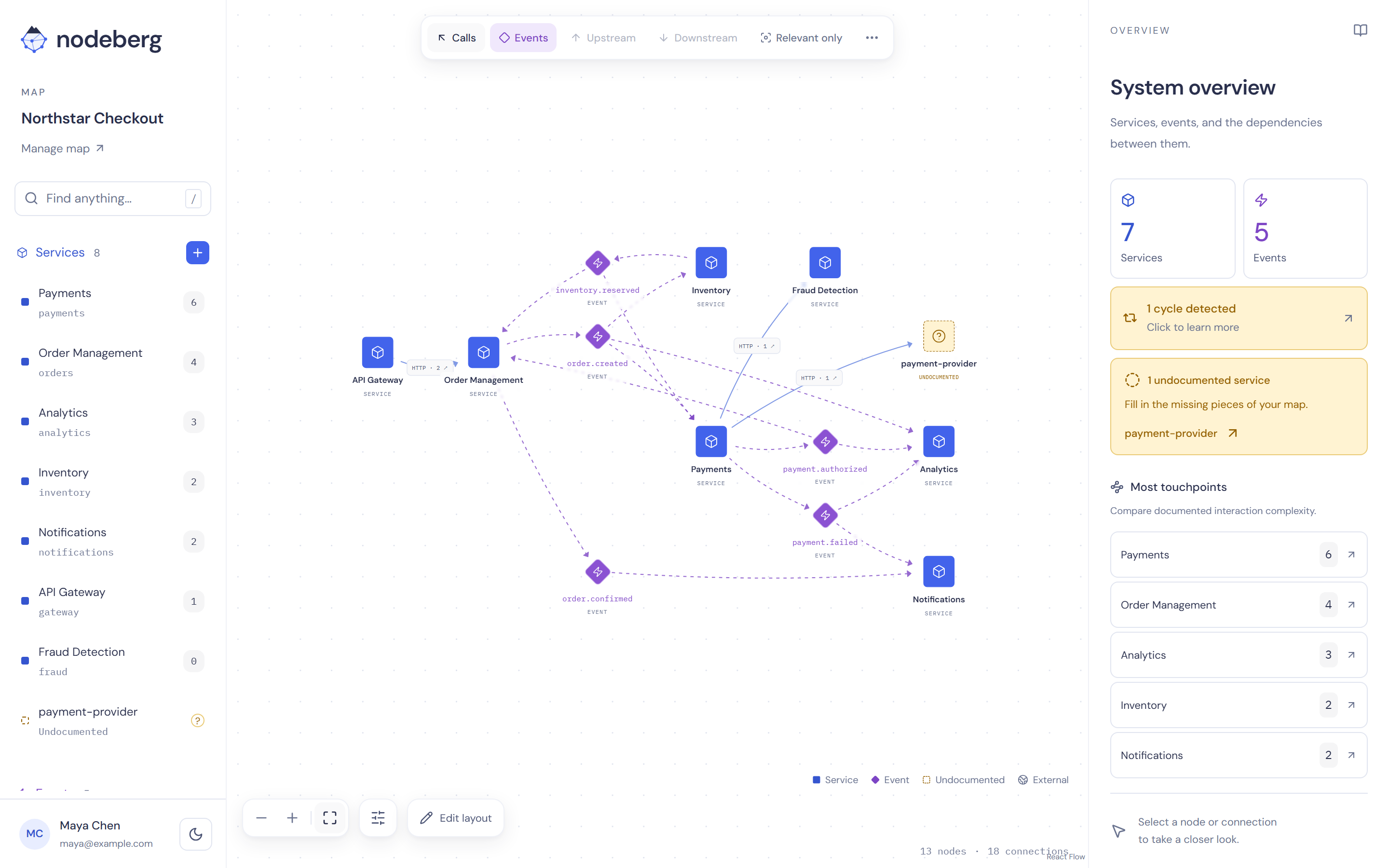
Switch to dark mode. The same services, events, and connections, in a theme that suits you.

Light or dark. Your map stays the same.

Nodeberg in dark mode showing the Northstar Checkout map with blue services, purple events, and the system overview.
Skip tourPricingLog in
Start free

New Map assistant

Changed something? Just say so.

Describe a change in your own words. The assistant proposes each edit as a sentence about your map, and nothing is saved until you apply it.

For your team

A shared understanding.

Your architecture shouldn’t leave with the person who knows it best. Give the next engineer a map they can explore, question, and keep up to date.

POST /risk/checkPOST /authorizationsPaymentsFraud Detectionpayment-providerorder.createdinventory.reservedpayment.authorizedpayment.failed
payments: name: Payments description: Checks risk and authorizes payment after an order is created and stock is reserved. Publishes the authorization outcome.
calls:
- service: fraud protocol: http description: Check the order before requesting authorization. operations: - POST /risk/check
- service: payment-provider protocol: http description: External payment authorization provider. operations: - POST /authorizations
consumes:
- order.created
- inventory.reserved
emits:
- payment.authorized
- payment.failed
Make room for everyone.
Invite viewers and editors, manage access in one place, and keep separate maps for your systems and projects.
Keep the why with the what.
Explore service descriptions, endpoint details, and notes beside the connections. See which source maintains each synced service.
Use the canvas. Keep the YAML.
Publish service definitions from CI, edit manual services visually or in YAML, and export the complete map with its layout.
Start your team’s first map

Try it with your team.
Keep your architecture current.

Start free with one map. Upgrade when your team needs more people, maps and editors.

Free

For you.

$0forever

Map a system and keep it in sync from CI.

  • 1 map
  • up to 3 people
  • 1 editor
Start freeCI sync included · No credit card required

Pro

For your engineering organization.

$99.99/ month

Cover every system your teams own.

  • 30 maps
  • 100 people
  • 25 editors
Get Pro$999/year available · Save 16.7%

Core mapping and CI sync included in every plan.

  • Call & event mapping
  • Visual & YAML editing
  • Dependency filters & cycle detection
  • YAML import & export
  • PNG & SVG image export
  • CI-driven YAML sync
  • Sync history & source ownership

Prices are per workspace in USD, excluding applicable taxes.
One map is one architecture document. Everyone in the workspace counts toward its people limit. An editor counts once across your workspace, including owners and admins, and editors have their own limit. Pipeline tokens don’t count.

A few practical questions?

Find answers about mapping, CI sync, access, and pricing.

Read the FAQ

Put the dependencies
where your team can find them.

Start free. Add a service by hand or publish your first YAML from CI.

Create your first map

Nodeberg screenshot

Nodeberg in a minute